
I’ve spent a good portion of the last few months spackling together my own orchestration systems building and shopping for tools that might help me become a better stage 7 ai-assisted developer and start to chase stage 8.
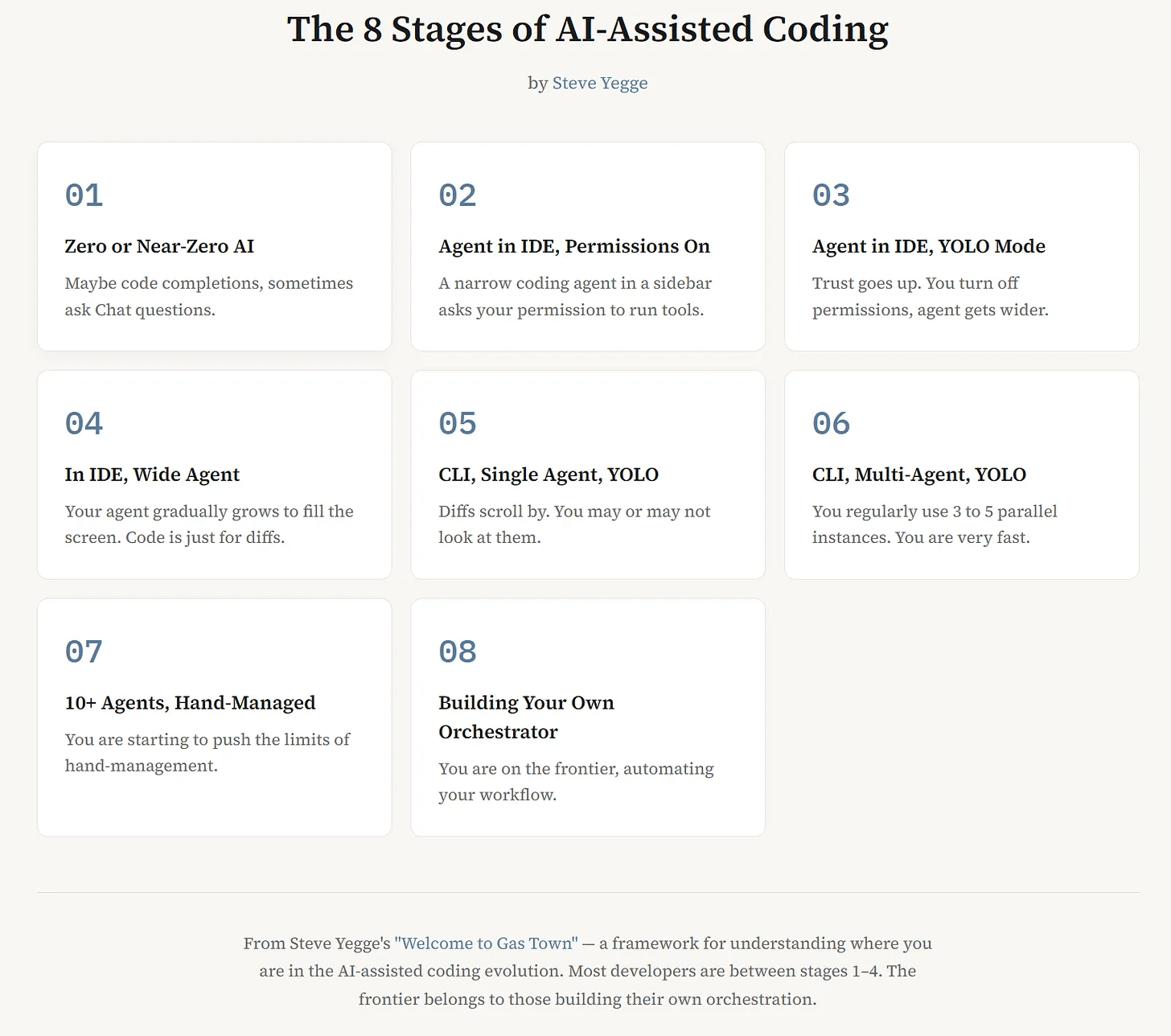
From what I have built and what I can see the orchestrator element of stage 8 is where the human time suck really starts to balloon. You’re spending a lot of time trying to get sessions talking to one another and maintaining state across those session. Beads does a good job maintaining state for me, I mostly still use it out of familiarity and it finally finding stability again after a chaotic few months. I’ve heard promising stories of people just hooking up an empty sqlite database and telling the agent to organize its own work in the way that most makes sense for this particular project that I want to try out though. The more time you spend here, the more you build here, the more you are just reinventing Gastown.
What if this could all be so much simpler?
I took a quick work trip and came back to find that Anthropic had just handed me everything I need to build myself an orchestrator through prompt engineering alone.
I was beginning to get used to surprise releases from Anthropic disrupting my workflow with their multi-agent work stomping all over my tmux-spawn skill (I still prefer my skill though I have delegated and reworked some subcommands).
Channels brought a whole different level of capability for me. I have been running a tiny experimental OpenClaw instance on an old Linux laptop for a while so I had already glimpsed what chatting with a persistent AI via Telegram could bring me, but that laptop had nowhere near enough resources to run a bunch of concurrent Claude Code sessions.
Combining channels with a 1 million token Opus window was the big unlock. I now could have a persistent Opus orchestration session that ran for 10-12 hours through 3 or 4 session limit windows. All I need to add is a single subagent doing quality work filing bugs with Playwright to make this a continuous loop that runs for days. For now I like my dedicated sessions with PM, Designer and Quality personas filling the backlog so I can do a little review of their work as the CEO.
Honestly the main limiting factor I’ve faced on these long running sessions is Anthropic’s heavy handed rate limiting on their usage endpoint. If they really wanted me using these tools to their fullest capability they’d invest in making that API highly available. I’m perfectly happy to tell my agents to back off if I know I’m approaching a usage window limit, but not knowing where I’m at is lame.
Two latent capabilities that really helped here are tmux capture-pane and tmux paste-buffer. Turns out tmux built in cross session communication years ago and Claude suddenly picked up on this capability and started using it without me telling it about it. Suddenly I didn’t have to build my own messaging or observation framework and could just observe tmux.
Here is my latest and greatest pasted prompt that I’ve been refining by watching different failure modes over the course of this week:
# AGENT DIRECTIVE: Continuous Issue Processing Loop

## Core Loop

Execute these steps in strict sequential order. Every step is mandatory — do not skip, reorder, or treat any step as advisory.

1. **Usage gate** — Run `curl` against the Anthropic API usage endpoint (or equivalent bash command) to check 5-hour window consumption. If ≥ 98%, pause spawning and report status. Do NOT use `/usage-check` — it is unavailable in autonomous mode.
2. **Context gate** — If current context ≥ 90% of 1M tokens, stop all work and report status.
3. **Pull** — Pull the next 3 issues from the Beads backlog.
4. **Spawn** — Start one tmux session per issue (3 sessions total). Always maintain 3 active sessions during processing.
5. **Poll** — Use `/loop 2m <prompt>` to schedule a recurring status check that inspects each tmux session's output for completion. Do NOT use `sleep` loops or `while true` constructs. The `/loop` command uses Claude Code's built-in CronCreate scheduler, which fires between turns and keeps this coordinator session free.
6. **On all 3 complete:**
   a. Delete the polling loop via CronDelete (the 8-char job ID from step 5). Failure to clean up will hit the 50-task session ceiling on long runs.
   b. Merge all 3 branches to main in this session. Resolve any conflicts here.
   c. Spawn a subagent to run the full CI suite (all tests, all linting — everything). Block until the subagent reports green.
   d. Do NOT proceed to the next batch until CI passes.
7. **GOTO 1**

## Session Role Boundaries

- **This (parent) session:** Coordination, merge conflict resolution, and loop management ONLY.
- **Subagents:** All builds, tests, linting, and Playwright runs. Nothing compute-heavy runs in the parent session. This preserves context for coordination.

## Invariants

- Always 3 sessions running during processing. If one fails, replace it before continuing.
- Never merge without passing CI in a dedicated subagent.
- Never spawn past either usage or context threshold.
- Always delete completed CronCreate jobs before creating new ones. Scheduled tasks are capped at 50 per session.
- Recurring `/loop` tasks expire after 3 days automatically, but do not rely on this — clean up explicitly.

## Anti-Patterns (do not do these)

- Do NOT use `while true; do sleep N; done` for polling. Use `/loop`.
- Do NOT use `/usage-check` or any slash command inside a scheduled prompt. Use bash commands that work non-interactively.
- Do NOT leave orphaned cron jobs between batches.
- Do NOT run tests or builds in this session.
I’d been doing some version of this for quite a while, much less sophisticated prompts along the lines of:
Using beads backlog as your source tmux-spawn issues in batches of three
Once those sessions complete (use output from tmux window to check completeness) merge to main in this parent session
Then spawn additional sessions to always have three running.
At the end of each batch run all tests to ensure there are no regressions.
On Monday we wiped out a big backlog in my brand new Agent Academy project that helps you learn how to use Claude code through playing a terminal spy game.
On Thursday Claude closed 75 issues and pushed over 80 commits to Agent Racer. All of this while I’m at work fully focused on my day job occasionally glancing at Telegram to make sure the loop is still looping. I’m paying less attention to these messages as I am to the stuff my friends on Telegram and Signal are posting.
When I get home my only job is to do some play testing, file a few bugs where things took a direction I wasn’t happy with, and then push all the commits and take all the credit in true CEO fashion.
I’m beginning to see my first glimpses of running a true software factory. My remaining limiting factors are 1) my Claude Max subscription limits and 2) the number of available machines and resources available on those machines to run concurrent sessions. I’m not really willing to invest any more cash (or electricity) to my side projects at the moment, but I could definitely see myself starting to roll out a factory at work with the lessons I’ve been learning here.
Yeah this was basically my cycle