Claude Code: Your Self-Customizing Editor
Teaching Claude to Configure Itself

When is the last time you wrote your own plugin for VS Code, Intellij or Neovim? Never?
The value derived vs the time spent building and maintaining a plugin was just always a poor tradeoff for me. When what you wanted to accomplish was highly nuanced and personal and not likely to be adopted by others it was even harder to commit to.
That equation is now flipped on its head for me. The cost of customization in Claude Code is minimal and the possibilities are almost endless.
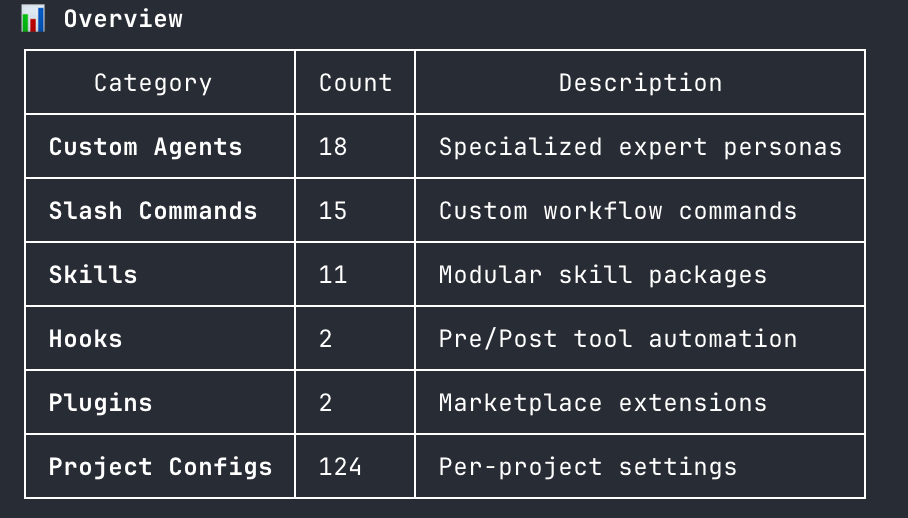
Here is a Claude-generated summary of all my customizations after about 8 months of daily Claude use.
I half read a blog post in between attempts to fall back asleep last Sunday morning and on Tuesday suddenly remembered that Claude Code now supports rules that load on-demand to help organize your CLAUDE.md instructions and avoid polluting the context window.
I immediately double checked with Claude that I didn’t hallucinate this new feature and then had it start implementing an organization scheme it thought would work well for me based on what was already there and my usage.
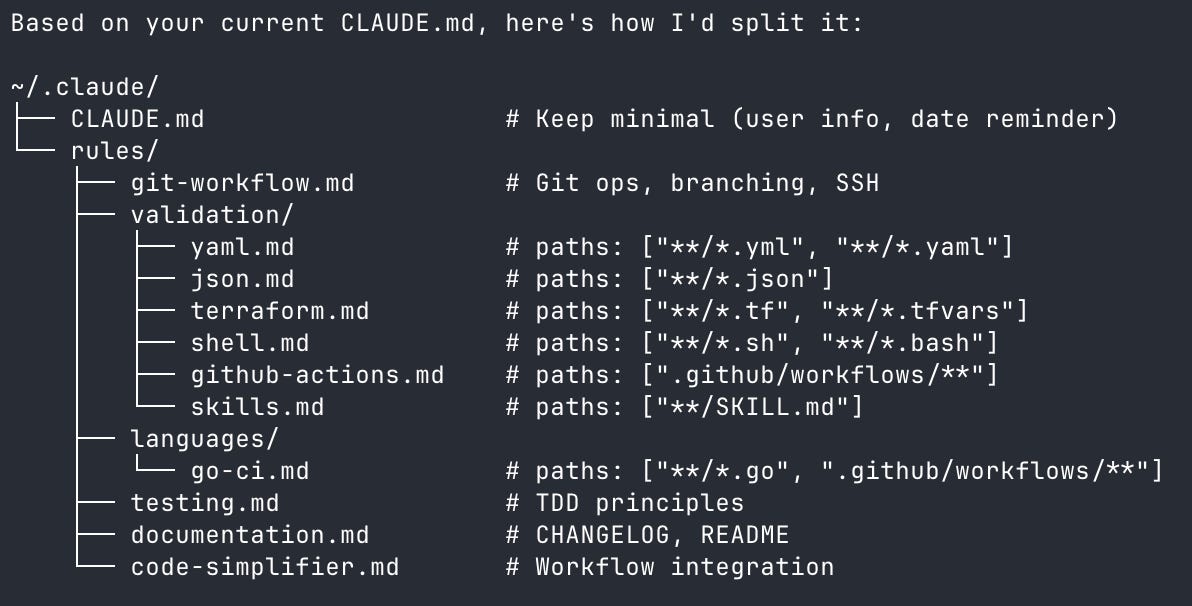
15 minutes later and I am using a brand new feature saving part of every context window on every request.
Claude is your best coach on how to use Claude. I always have an open Claude session in my ~/.claude folder thats adding features, tweaking existing ones and giving me feedback on how well I’m using the available features. It maintains a MARK-TODO.md file that keeps track of new techniques to try and existing workflows to optimize.
Skills
When I added my first few skills just after the feature announcement I had to copy and paste in the newly-published docs links and really push Claude to get something that worked. Now when I create a new skill it automatically refers to the docs as well as looking at my previous examples to get them to match both technically and stylistically. I don’t even have to use the skill-creator skill.
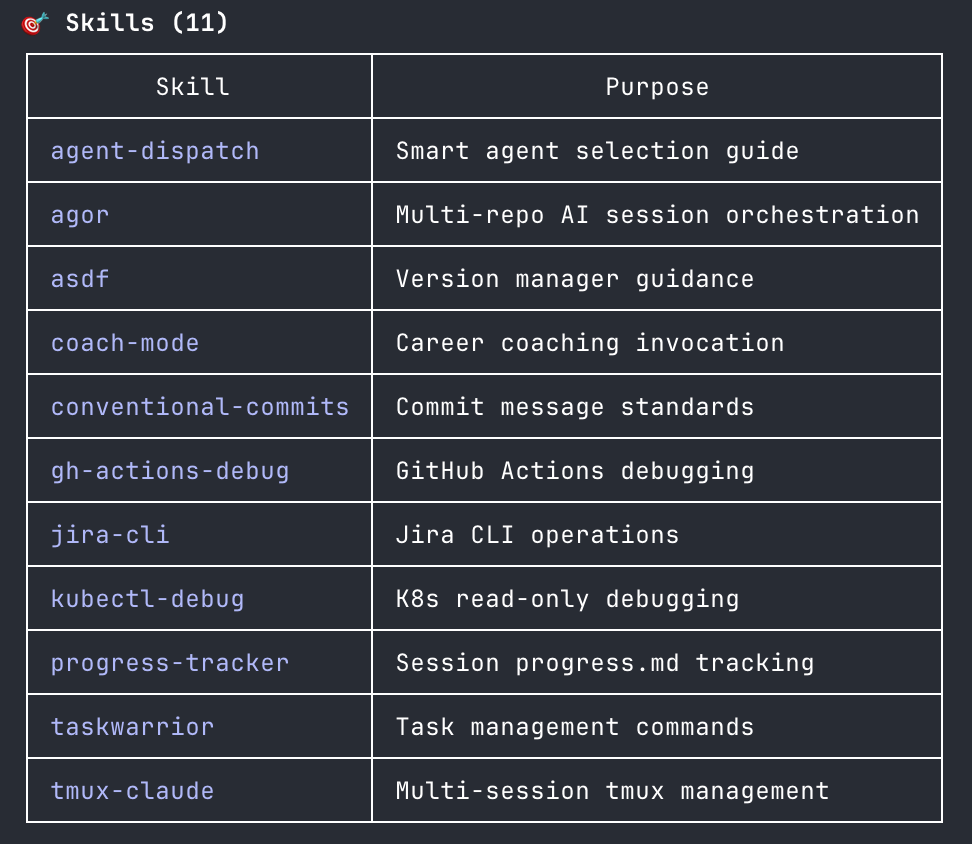
A lot of “features” I am building are around validation. I saw Claude using the new spec at agentskills.io so I set myself up to automatically validate Skills against the spec.
Skills are a narrowly targeted solution to a specific problem, don’t use asdf? Don’t bother with my skill that reminds Claude to reshim after a nodejs installs. You really don’t want to go down this road unless you absolutely need multiple concurrent versions of command line tools to get your work done.
With skills you are nudging rather than commanding, you are working directly with the model not specifying an api.
My config is mostly reactive from watching Claude struggle with a task I intuitively thought it could do better with. Each skill loaded burns tokens up front but then uses less tokens out the other end wasting a session looping trying to solve problems that are straightforward if you know the right steps to follow.
I get a lot of mileage out of my tmux-claude skill in particular for managing and creating tmux panes, the others are mainly reminding the robot that it has certain things buried in its training data that I want to be front and center like Kubernetes operational trivia.
Slash Commands
Slash commands predate Skills by a bit, but having Skills beside them has made slash commands a lot more useful for me.
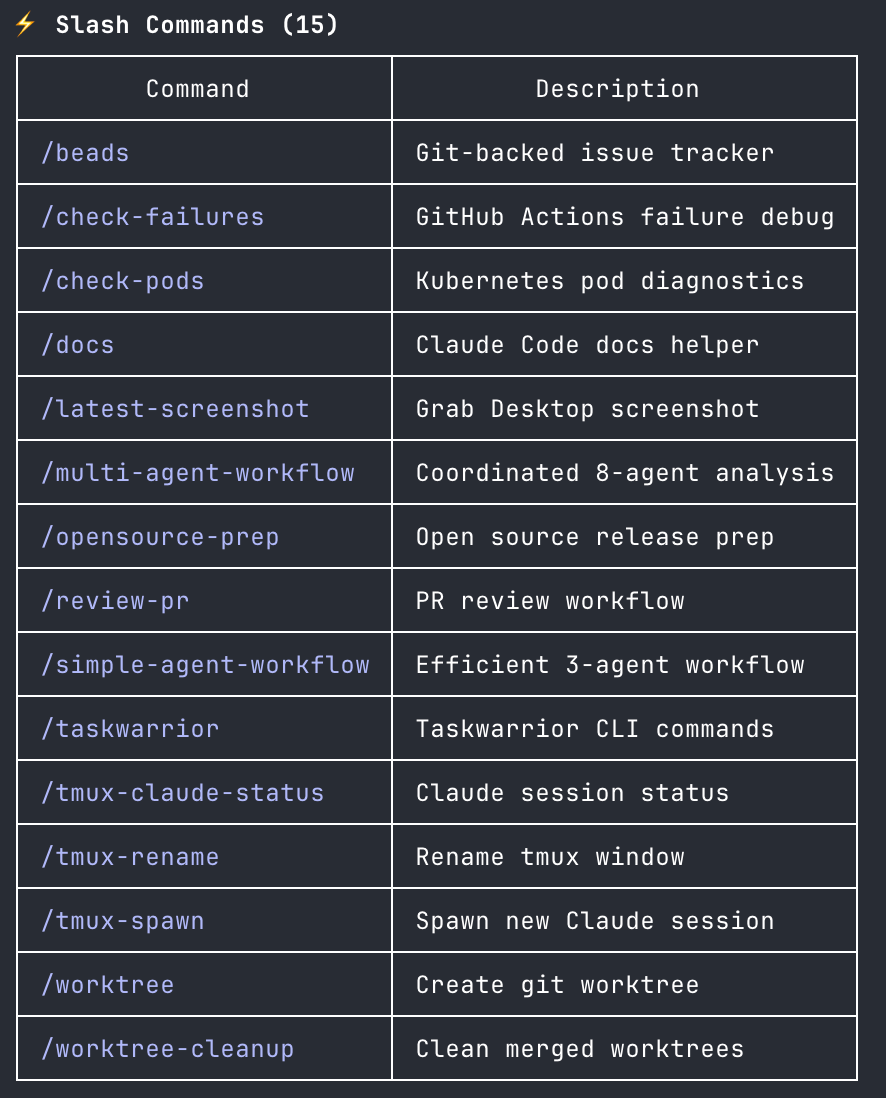
Many of my slash commands come out of a session where I’m creating a skill or modifying an existing one.
Where skills can be loose slash commands need to be more specific, they are a piece of a workflow not the entire workflow. Skills describe the possible workflows and slash commands describe the possible repeatable steps.
Slash commands can still be defined independently but they really sing as part of a Skill.
You get the same benefits here as we got with skills where the agent might loop on solving a problem in creative ways each time, a slash command puts a potential solution front and center with some nice metadata for the model to chew on. The last place you want the model flexing its creativity is when its running a bash command, slash commands are a friendly wrapper around that.
Agents
I love my agents, please don’t take my agents away from me, I’m not sure I could make it through my day without my agents.
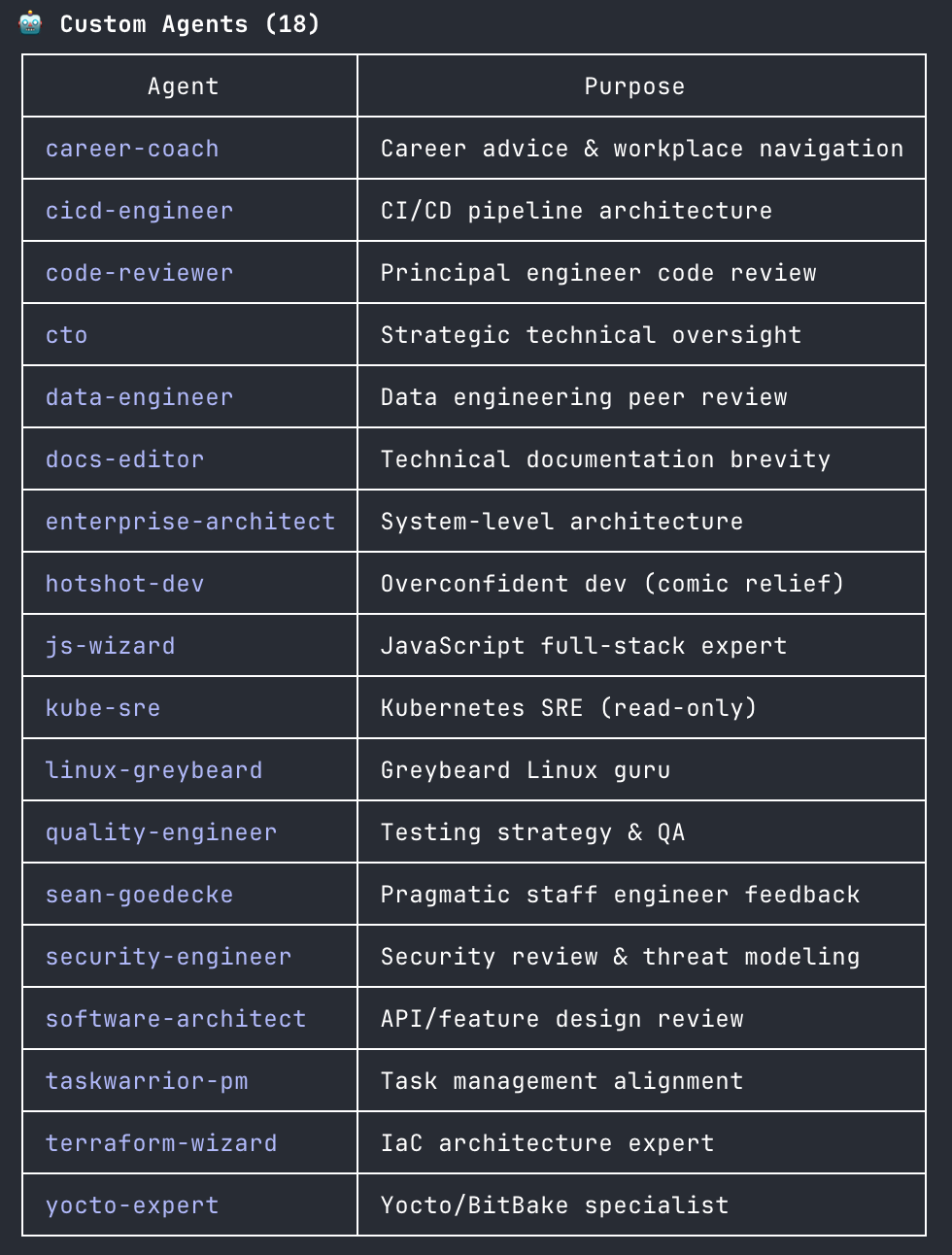
In my role I can spend a lot of my time architecting and reviewing solutions not just building things. My agents are most useful while reviewing PRs, reviewing in-progress documents, and reviewing in-progress projects. They are intentionally designed and refined to contradict one another and push back against my own biases. I tend to model them after the best peers in that job category I’ve ever worked with, people I’d love to work with, or when I need some comic relief my most chaotic former coworkers. My linux-greybeard’s obsession with how much harder Linux was in the nineties is always grounding. The CTO is always helpful reminding me when I’m overengineering something.
I don’t actually use agents much during the building of features, they get pulled in up front to help provide opinions on a design and then at the end of implementation to review for gaps completeness (or overengeneering on the other side).
Hooks
I’m a former Drupal developer, so you already should know I love me some hooks. Everything else I’ve shared falls into the category of suggestions for how I’d like the tool to work, usually my preferences apply but sometimes they are completely ignored.
Hooks are much stricter in that they always run. You need to be careful with hooks if you are coming to AI tools to try and 10x your productivity hooks can very quickly start to kill sessions mid-work and confuse the model which doesn’t seem to see the full hook output why it can’t complete a task.
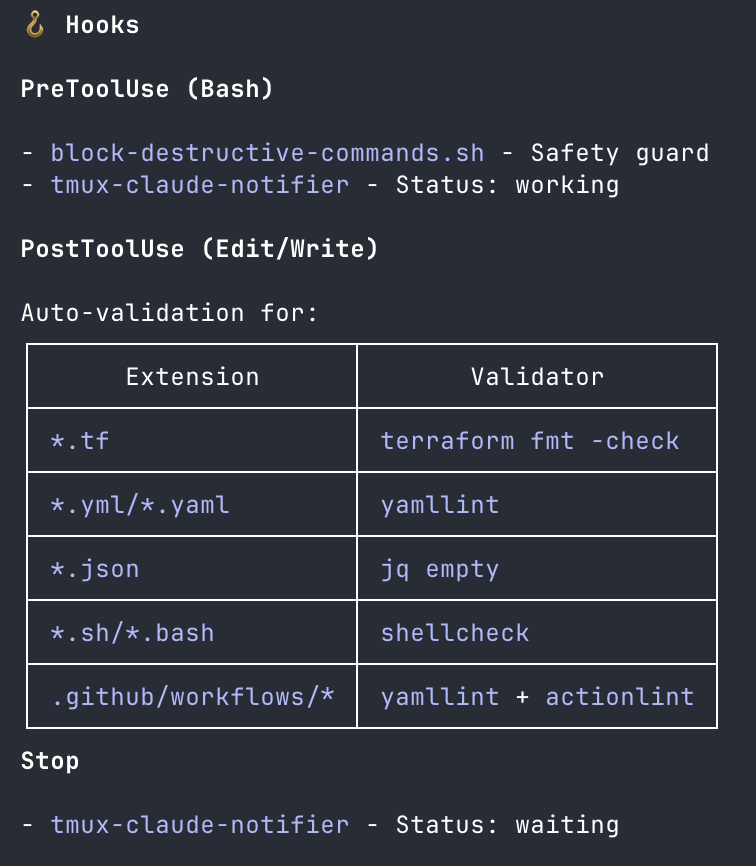
My main use for hooks is permissions. I’ve enabled a lot of tools by default, so with Bash enabled I need to do a hard check for the bot getting too creative and trying to bypass some of my suggested ways to work. This is essentially a bash script doing a regex on the command signature. The fact it runs on every command is absolutely essential.
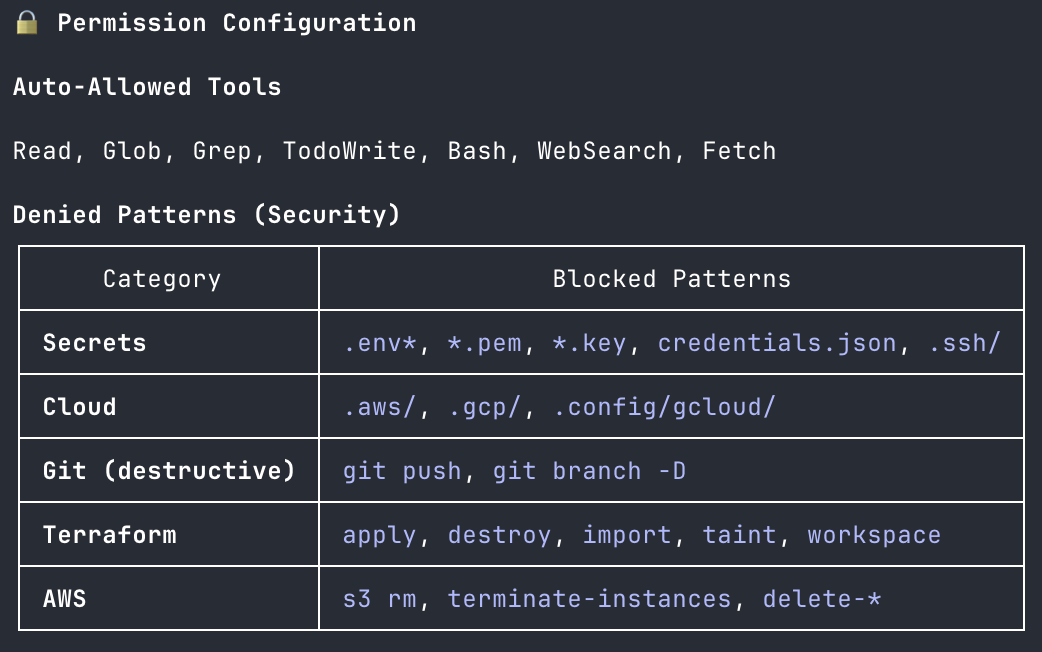
You’ll notice MCP completely missing from this post. I will use MCPs in the Claude Electron app to talk to Confluence or Google docs, but the context tradeoff is just way too high for me when I’m working in Claude CLI. Claude already knows about every popular command-line tool and you can easily make it aware of a less popular one with a skill.
Conclusion
I know that its already a meme to dunk on a developer for spending too much time personalizing their editor, but honestly the time cost here is tiny compared to what it used to be. I always have a config session open and getting Claude to edit some yaml or produce some new yaml is not a task that it struggles with. Editing the moving target settings.json is a whole different matter, I’ve spent longer on this ever-changing supposedly well-formatted well-documented json than I have on any of the thousands of lines of markdown powered config.
The part that scares me is how sticky this all has become for me. I spent some time trying to port some of my skills to opencode with very mixed results. Even keeping my personal config at home synced to my work config is daunting given how differently I work with Claude in those two settings.
Don’t hold back, just pop open a Claude session in your .claude directory and let it spitball a few ideas with you based on your recent commands, you won’t regret it.